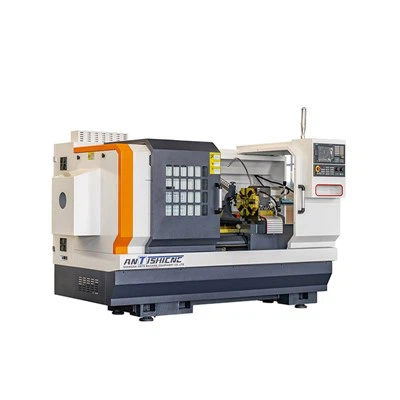
Hey there! I'm a supplier of Fanuc CNC Lathes, and today I'm gonna share with you how to program a facing operation on a Fanuc CNC Lathe. Facing is a fundamental operation in turning, and getting it right is crucial for achieving accurate and high - quality parts.
Understanding the Basics of Facing
Before we dive into programming, let's quickly go over what facing is. Facing is the process of machining the end surface of a workpiece to make it flat and perpendicular to the axis of rotation. This operation is often one of the first steps in a turning process, as it sets a reference surface for subsequent machining.
Prerequisites
First off, you need to have a basic understanding of G - codes and M - codes. G - codes are used to control the motion of the machine tool, like moving the tool along the X and Z axes. M - codes, on the other hand, are used for miscellaneous functions such as turning the spindle on or off, or controlling the coolant.
You also need to know the specifications of your Fanuc CNC Lathe. This includes the maximum spindle speed, the feed rate capabilities, and the tooling options available.
Setting Up the Machine
Tool Selection
For facing operations, you'll typically use a facing tool. This tool has a cutting edge that is designed to remove material from the end of the workpiece. Make sure the tool is properly installed in the tool holder and that it is sharp. A dull tool can lead to poor surface finish and inaccurate cuts.
Workpiece Mounting
Secure the workpiece in the chuck or collet of the lathe. Make sure it is centered and tightened properly. An off - center workpiece can cause vibrations and inaccurate machining.
Zeroing the Axes
Before you start programming, you need to zero the X and Z axes. This sets the origin of the coordinate system for your machining operation. On a Fanuc CNC Lathe, you can usually do this by using the machine's control panel.
Programming the Facing Operation
The Program Structure
A typical Fanuc CNC program for a facing operation will have the following structure:
Oxxxx ; Program number
N10 G21 ; Set units to millimeters (or G20 for inches)
N20 G97 Sxxxx M03 ; Set constant spindle speed and turn on the spindle
N30 Txx00 ; Select the tool
N40 G00 Xxx Zxx ; Rapid traverse to the starting position
N50 G01 Xxx Zxx Fxxx ; Feed to the cutting position at a specified feed rate
N60 G01 X0 Zxx Fxxx ; Perform the facing operation
N70 G00 Xxx Zxx ; Rapid traverse back to a safe position
N80 M05 ; Turn off the spindle
N90 M30 ; End of program
Let's break down each line:
- Oxxxx: This is the program number. You can choose any number you like, but it's a good idea to use a logical numbering system, like starting with 1000 and incrementing by 1 for each new program.
- N10 G21: The
G21code sets the units to millimeters. If you prefer to use inches, you can useG20instead. - N20 G97 Sxxxx M03:
G97sets the spindle to run at a constant speed.Sxxxxspecifies the spindle speed in revolutions per minute (RPM).M03turns on the spindle in the clockwise direction. - N30 Txx00: This line selects the tool. The
Txxpart specifies the tool number, and the00indicates that the tool offset is not being used at this time. - N40 G00 Xxx Zxx: The
G00code is for rapid traverse. It moves the tool to the starting position as quickly as possible. TheXxxandZxxvalues specify the coordinates of the starting position. - N50 G01 Xxx Zxx Fxxx:
G01is a linear interpolation code. It moves the tool in a straight line from the current position to the specified coordinates at a specified feed rate. TheFxxxvalue is the feed rate in millimeters per revolution (or inches per revolution if usingG20). - N60 G01 X0 Zxx Fxxx: This line performs the facing operation. The
X0value means that the tool will move towards the center of the workpiece, effectively facing the end surface. - N70 G00 Xxx Zxx: After the facing operation is complete, the tool is rapidly traversed back to a safe position.
- N80 M05: This turns off the spindle.
- N90 M30:
M30indicates the end of the program.
Example Program
Let's say we have a workpiece with a diameter of 50 mm, and we want to face it to a depth of 2 mm. Here's an example program:
O1000
N10 G21
N20 G97 S800 M03
N30 T0100
N40 G00 X52 Z2
N50 G01 X50 Z2 F0.2
N60 G01 X0 Z2 F0.2
N70 G00 X52 Z2
N80 M05
N90 M30
In this program, the spindle speed is set to 800 RPM, the tool number is 01, the starting position is X52 Z2, and the feed rate is 0.2 mm per revolution.
Tips for a Successful Facing Operation
- Check the Tool Offset: Make sure the tool offset is set correctly. An incorrect tool offset can lead to inaccurate cuts.
- Use a Coolant: Using a coolant can help to reduce heat and improve the surface finish of the workpiece. You can turn on the coolant using an
M08code in your program. - Monitor the Machining Process: Keep an eye on the machining process. If you notice any vibrations, strange noises, or other issues, stop the machine immediately and investigate the problem.
Different Types of Fanuc CNC Lathes
We offer a variety of Fanuc CNC Lathes, including Horizontal Slant Bed Lathes and Slant Bed CNC models. Each type has its own advantages and is suitable for different applications.
Horizontal slant bed lathes are known for their high rigidity and stability, which makes them ideal for heavy - duty machining. Slant bed CNC lathes, on the other hand, offer better chip evacuation and easier access to the workpiece, which can improve productivity.
Conclusion
Programming a facing operation on a Fanuc CNC Lathe is not as complicated as it may seem. By understanding the basic principles of G - codes, M - codes, and the machine's capabilities, you can create accurate and efficient programs.
If you're interested in purchasing a Fanuc CNC Lathe or have any questions about programming or machining operations, don't hesitate to reach out. We're here to help you make the most of your machining operations.


References
- "CNC Programming Handbook" by John A. Reha
- Fanuc CNC Lathe Operator's Manual